


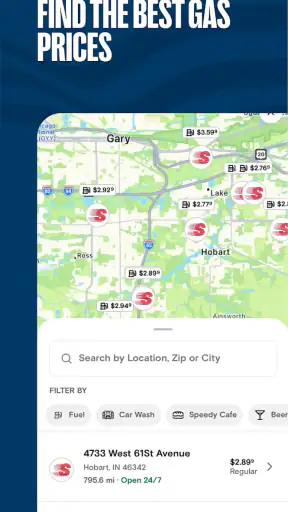
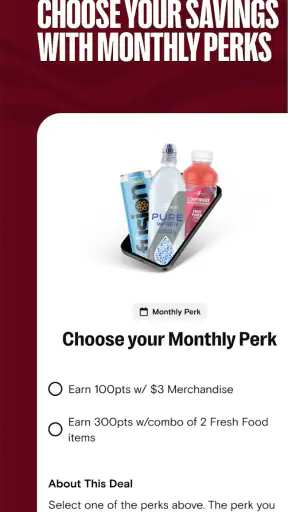
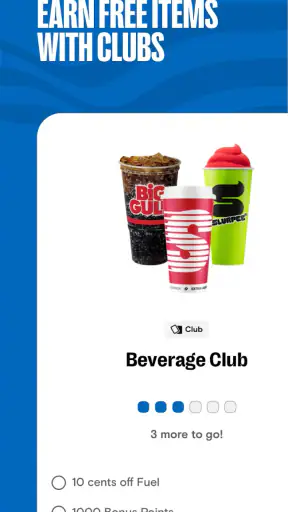
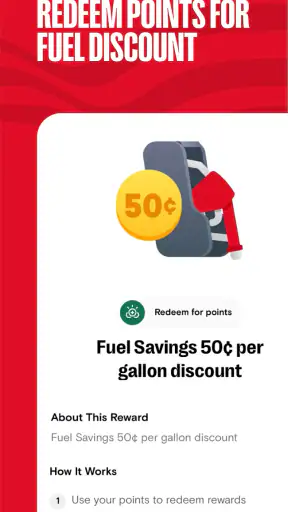
When I first opened Speedway: Rewards & Shopping, I treated it less like a traditional shopping app and more like a practical companion for visits I was already planning to make. Its focus is straightforward: help regular Speedway customers find monthly perks, fuel savings, and offers reserved for app users. That makes it most useful when the app becomes part of your normal stop rather than something you install once and forget.
This is a free Food & Drink app from 7-Eleven, Inc., aimed at Everyone. It has been available since October 3, 2012, and its long presence is reflected in a 4.9 average from around 139 thousand ratings, with more than 5 million installs. Those figures suggest that it has found a clear audience, but they do not remove the need to understand how it fits into your own routine. If you rarely visit Speedway, the benefits may feel limited. If you buy fuel or convenience items there regularly, the app has a much stronger reason to stay on your phone.
What the app is really useful for
The first thing to expect is a combination of rewards access, shopping support, and fuel-related savings. I would not install this expecting a broad restaurant marketplace or a general-purpose budgeting tool. Its value is tied to Speedway, so the best results come from checking the app before a planned visit and then using what is relevant during that stop.
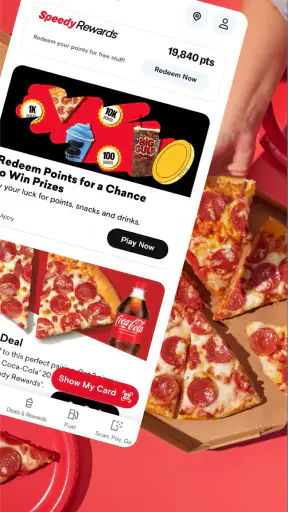
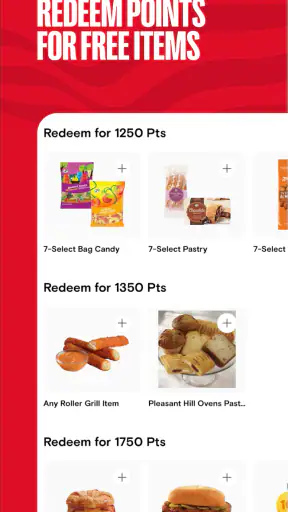
The monthly perks are particularly important because they give the app a changing reason to reopen. Instead of relying only on a permanent loyalty balance, I found it more sensible to look at the current offers before deciding what to buy. That small habit can prevent a common mistake: making an unnecessary purchase simply because an offer is visible. The app works best when it helps you choose between things you already need.
Fuel discounts are another practical reason to keep it installed. A discount can matter more on a normal fill-up than a small convenience-store promotion, especially for commuters or families who refuel frequently. The trade-off is that savings are only meaningful when Speedway is already a convenient option. Driving out of your way just to chase an offer can easily cancel out the benefit through extra time and fuel.
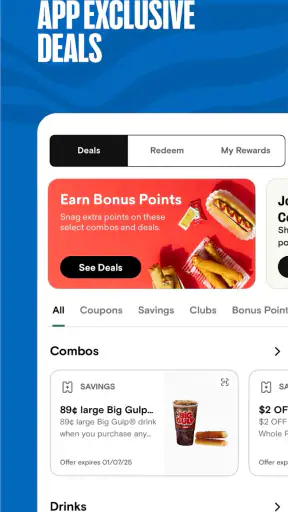
App-exclusive deals also change how I would use it. Rather than browsing casually while standing at the counter, I recommend checking before leaving home or while parked. That gives you time to understand which offer applies to your intended purchase and avoids the pressure of making decisions at checkout. The most useful workflow is check, choose, then shop, not shop first and hope the app fixes the price afterward.
Who will get the most from it
I think the app is a good match for people who already use Speedway for fuel, snacks, drinks, or quick everyday purchases. It is also appealing if you like having one place to review current perks instead of relying on paper promotions or trying to remember what was advertised during a previous visit.
It is less compelling for someone who visits only occasionally, has no Speedway location along their usual routes, or prefers to compare every fuel price across several stations before stopping. In those cases, a location-agnostic fuel comparison service may be more useful, while a general grocery or restaurant rewards app may offer broader value. This app is deliberately narrower, and that narrow focus is both its strength and its limitation.
Getting started without overcomplicating it
After installing it, I would begin by treating setup as preparation for the first visit rather than trying to explore every screen immediately. Open the app, look for the current perks and deals, and identify the part that matches your reason for being there: fuel, a store purchase, or both. The goal is to find one useful action quickly, not to understand every available section on the first minute.
It is worth taking a moment to make sure your account details and reward-related information are ready before you are at the pump or in line. Any loyalty app becomes frustrating when the user is trying to register, search for an offer, and complete a purchase at the same time. I prefer doing the initial setup at home, where I can read each screen and avoid holding up the next customer.
The app runs on operating systems version 10 or later, so compatibility is an easy first check for anyone using an older device. Its current version is 7.2608.0. Keeping the app current is sensible for a service built around changing offers, because an outdated installation may not present the same experience as the latest release.
One useful approach is to decide in advance what success means for your first session. For me, that would be finding a relevant offer and knowing how I intend to use it on the next Speedway visit. You do not need to collect every available benefit immediately. A single clear saving or a smoother purchase is a better first test than spending time cataloging promotions you may never use.
Your first meaningful success
A realistic first-use scenario would be a weekday commute. Before leaving, I would open the app and check whether a fuel-related saving or a suitable store deal is available. If I was already planning to stop at Speedway, I would note the offer, complete the visit normally, and then confirm that I had followed the required steps. This turns the app into a small part of an existing routine instead of a separate chore.
For a store purchase, the same principle applies. Suppose I need a drink and a snack during a road trip. I would review the available app deal before entering, select something I was likely to buy anyway, and keep the app ready while completing the purchase. The practical insight here is to use the app as a decision aid before shopping, because that is when it can influence your choice without making the checkout process feel rushed.
Fuel users should think about timing as well. Checking the app after pulling up to the pump is possible, but it is not the calmest moment to learn how a benefit works. Looking beforehand lets you decide whether the saving is worth using and whether you need to take any preparatory step. I would rather spend a few seconds in the parking lot than discover an important condition while the transaction is already underway.
Another useful habit is to separate “available” from “worth using.” An offer may look attractive in isolation, but it still needs to fit your actual purchase. If the deal encourages an item you did not want, the discount is not automatically a saving. This is especially important with convenience-store shopping, where small add-on purchases can quietly increase the total.
Where first-time users can get confused
The biggest source of confusion is usually the difference between seeing a promotion and successfully applying it. A deal shown in the app is not the same as a discount already reflected in your purchase. I recommend reading the offer details before relying on it, then checking the final transaction rather than assuming everything worked because the promotion appeared on screen.
Monthly perks can also create a false sense of urgency. Because offers change, users may feel they need to use every benefit before it disappears. I find it healthier to treat them as optional advantages. If one fits your route and your shopping list, use it. If not, ignoring it is better than spending extra money or making an inconvenient detour.
Another point to watch is the difference between fuel savings and merchandise deals. They serve different shopping moments, and it is easy to open the app expecting one type of benefit while looking at another. Before you start a purchase, identify whether you are trying to reduce the cost of fuel or find a store promotion. That simple distinction makes the app feel much less cluttered.
Users who are accustomed to general payment wallets may also expect Speedway’s app to replace every part of the transaction. I would not make that assumption. I use it primarily to review rewards and deals connected with Speedway shopping. If your priority is universal payment support, receipt management across many retailers, or broad price comparison, another app may be a better central tool.
There is also a human factor: the app cannot make an inconvenient Speedway location convenient. A promotion does not compensate for a long detour, a crowded stop, or a route that does not normally pass one of the stores. I see the service as an enhancer for existing customers, not as a reason to reorganize an entire journey.
How it compares with ordinary alternatives
Without a dedicated app, many people simply choose a station based on route, visible price, or habit. That approach is faster when you are in a hurry and do not want another account or another screen. Speedway’s advantage is that it adds a loyalty layer to a decision you may already be making, especially when an app-only promotion or fuel discount is relevant.
Compared with a general rewards wallet, this app offers a more focused experience. You are not trying to organize points from unrelated stores; you are looking specifically at Speedway benefits. That focus can make it easier to act on a relevant deal, although it also means the app has less value on days when you shop elsewhere.
Fuel-price comparison tools have a different purpose. They can help you decide where to stop based on prices across multiple stations, while Speedway’s app is more useful after Speedway is already under consideration. I would use a comparison tool when the route is flexible and the price difference matters most. I would use this app when Speedway is convenient and I want to see whether loyalty benefits improve that particular stop.
Paper coupons and signs at the station may still be simpler for someone who dislikes digital rewards. The app’s advantage is having current offers available before the visit, but its disadvantage is the extra step of opening the phone and making sure you understand the promotion. Whether that trade-off is worthwhile depends on how often you shop there.
Small habits that make the experience better
I would keep notifications and checking habits purposeful rather than opening the app repeatedly throughout the day. A quick review before a planned fuel stop or shopping trip is more useful than browsing without a purchase in mind. This also reduces the temptation to buy something merely because a deal is displayed.
For frequent drivers, it helps to create a simple personal rule: check before the route begins, not while driving. If you are a passenger, you can review the app safely; otherwise, wait until you are parked. The app is meant to support a stop, not distract from the road.
For families, the best use may be agreeing on the purchase before entering the store. A parent can check the available deal, decide what fits the budget, and avoid last-second requests based on whatever promotion happens to be visible. That turns a rewards app into a modest planning tool rather than an impulse-shopping trigger.
For occasional users, I would not keep a complicated routine. Install it when you know you will be making several Speedway visits, complete the setup in a quiet moment, and check the available benefits around those trips. If your visits remain rare, the app may not earn a permanent place on your home screen, and that is a reasonable conclusion rather than a failure.
My recommendation after using it
Speedway: Rewards & Shopping is at its best when it stays close to a real need: fuel you were already going to buy or a store item already on your list. The monthly perks, fuel discounts, and app-exclusive deals give regular Speedway customers reasons to check in, while the free price removes the main barrier to trying it.
I appreciate that the app has a clear purpose, but I would not recommend it blindly to every driver. If you want one app to compare every station, manage rewards from many retailers, or handle all your shopping, this is too specialized. If Speedway is part of your normal route, though, the focused approach makes sense. The app’s high average rating and broad install base support its appeal, but your own visit frequency is the more important test.
My advice to a first-time user is simple: install it before your next planned Speedway stop, complete setup while you have time, and look for one offer that matches something you already intend to buy. Use that first visit to learn how the benefit fits into your routine. If the process feels easy and the saving is relevant, keep it available for future stops. If you rarely visit Speedway or find that other services help you compare prices better, you can skip it without missing a general-purpose shopping essential.
In short, I see this as a practical loyalty companion rather than an app you browse for entertainment. Its value comes from preparation and consistency. For regular Speedway customers, the best reason to keep it installed is the chance to turn an ordinary stop into a slightly better-value one without changing the trip itself.


